Work in Practice

Work in Practice

Not a collection of isolated projects — evidence of how one learning philosophy travels across very different environments: the room, the organization, and the industry.

3

Movements

One evolving practice across the arc.

10+

Years

Learning across industries and audiences.

1

Purpose

Helping people understand, adapt, and grow.

Three movements · one practice

Three Movements. One Practice. Helping People Learn Across Contexts.

How I work

People First

Design begins with the human on the other end — not the artifact.

Purposeful

Every choice solves a real problem someone was carrying.

Continuous Improvement

Small, steady systems that give people time back and let ideas evolve.

Helping people grow through thoughtful learning, communication, and continuous improvement.

Movement I · Communities

Creating Learning Communities

How does Camilla create learning communities? By designing the systems, communication, and everyday rituals that make a room feel known — for children, teachers, and families alike.

Three ideas

If a visitor remembers only three things after this movement, let them be these.

  1. 01

    She designs systems,

    not just training.

  2. 02

    She builds communities,

    not just communications.

  3. 03

    She uses AI strategically

    to amplify human connection.

The practice

One professional practice, illustrated through several examples — Learning Adventures, family communication, teacher support, community rituals, and AI in the everyday.

Plate 01 · One example of the practice

One example of the practice

Learning Adventures

A KinderCare enrichment program, made meaningful and sustainable at our center.

Opportunity

Learning Adventures already existed within KinderCare's enrichment model, but it was not active at our center. The opportunity was to make it meaningful and sustainable for the children, families, and teachers in our own community.

Approach

I considered our families' interests, the cultures represented at the center, and what teachers could realistically sustain. I then designed the visual identity, communication, enrollment experience, and supporting classroom materials.

Experience

Little Yogis supported movement and mindfulness. Cooking Around the World connected food, geography, traditions, and family participation, intentionally reflecting cultures represented within our center.

Impact

Two programs remained active throughout the year, enrollment stayed strong, and families recognized and asked for the experiences by name.

The Evolution

  1. Existing opportunity

    Learning Adventures was available within KinderCare but not active at our center.

  2. Community insight

    Family interests, cultural representation, and teacher capacity informed the design.

  3. Experience design

    Identity, communication, enrollment, and classroom resources brought the program to life locally.

  4. Sustained programs

    Little Yogis and Cooking Around the World remained active and recognizable.

Plate 02 · Impact, at a glance

Making an Impact Every Day

Small, consistent choices — measured where it matters.

Level 5

Family & Employee Surveys

Highest KinderCare designation across both audiences.

85%+

Survey Engagement Increase

More families and employees participating in feedback.

75%+

Parent Reactions & Comments

After consistent app communication took hold.

35%+

Learning Adventures Enrollment

Exceeded the 20% goal set for the year.

High Capacity

Sustained Enrollment

Learning Adventures consistently reaching strong enrollment.

Movement I

Leading change from inside the day

A Communication
Ecosystem

None of this began as a project. It began as small operational moments — a family unsure what happened today, a teacher chasing a supply, a milestone that passed without anyone noticing.

I looked at those moments together rather than one at a time, and designed for the pattern underneath them: how information moved between families, teachers, and the wider community.

Every system had to work for more than one audience at once — families, teachers, the center director, and district leadership. Separately they look like materials. Together they were the operation the center ran on.

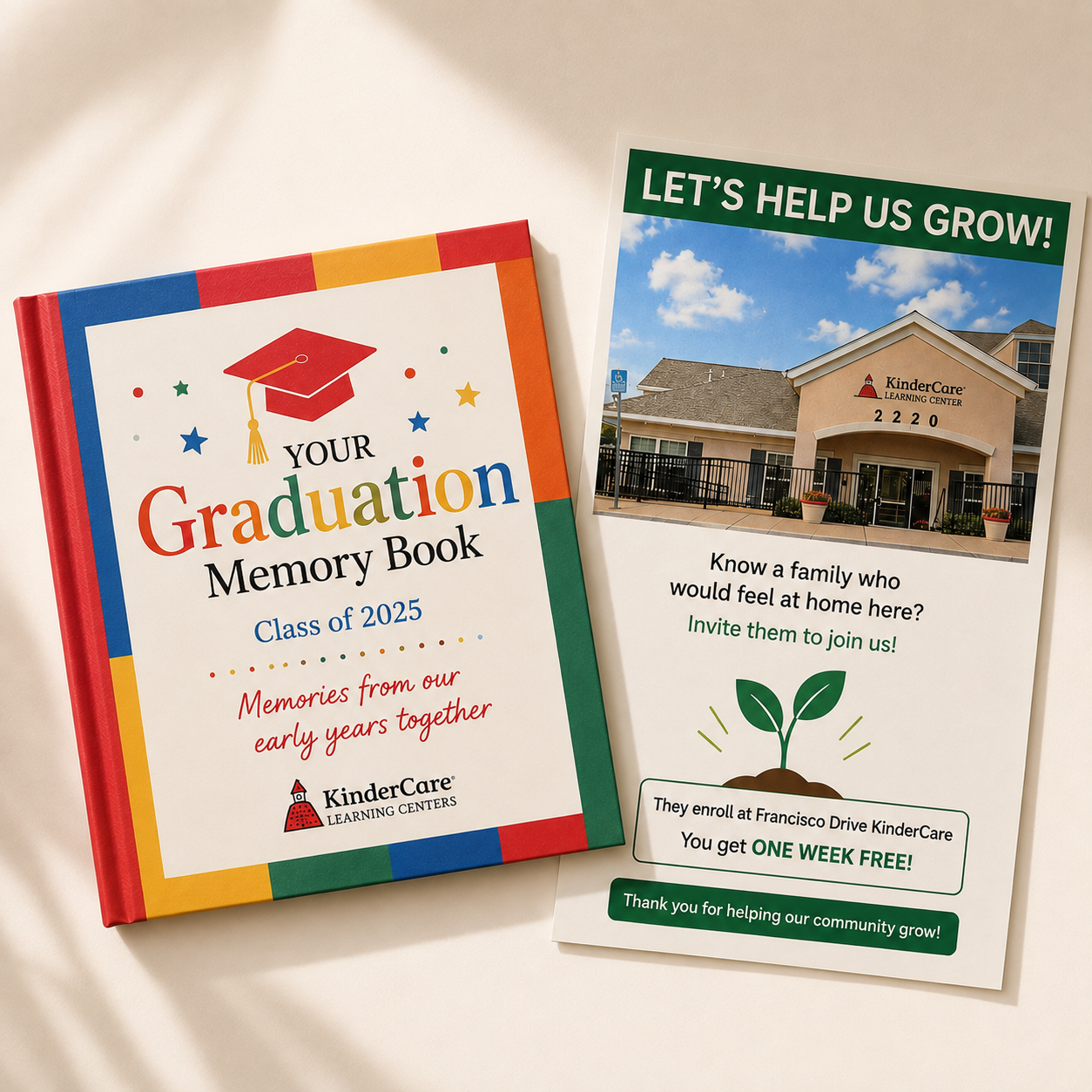
  1. 01For families

    Family Experience

    Families formed their opinion of the center in the gaps — the tour, the first week, a transition, the last day.

    I designed communication around those moments instead of around the calendar, so trust was built on purpose rather than left to chance. The same system that reassured current families became the one that brought new ones in.

    • Graduation Memory Book
    • Transition communication
    • Family referral campaign

    Trust is rarely won in one message. It is built by a system that keeps showing up at the right moment.

    Selected artifact

    Graduation Memory Book cover beside a family referral campaign flyer
    Graduation Memory Book & Transition Flyer — supporting families through meaningful transitions.
  2. 02For children and families

    Learning Adventures

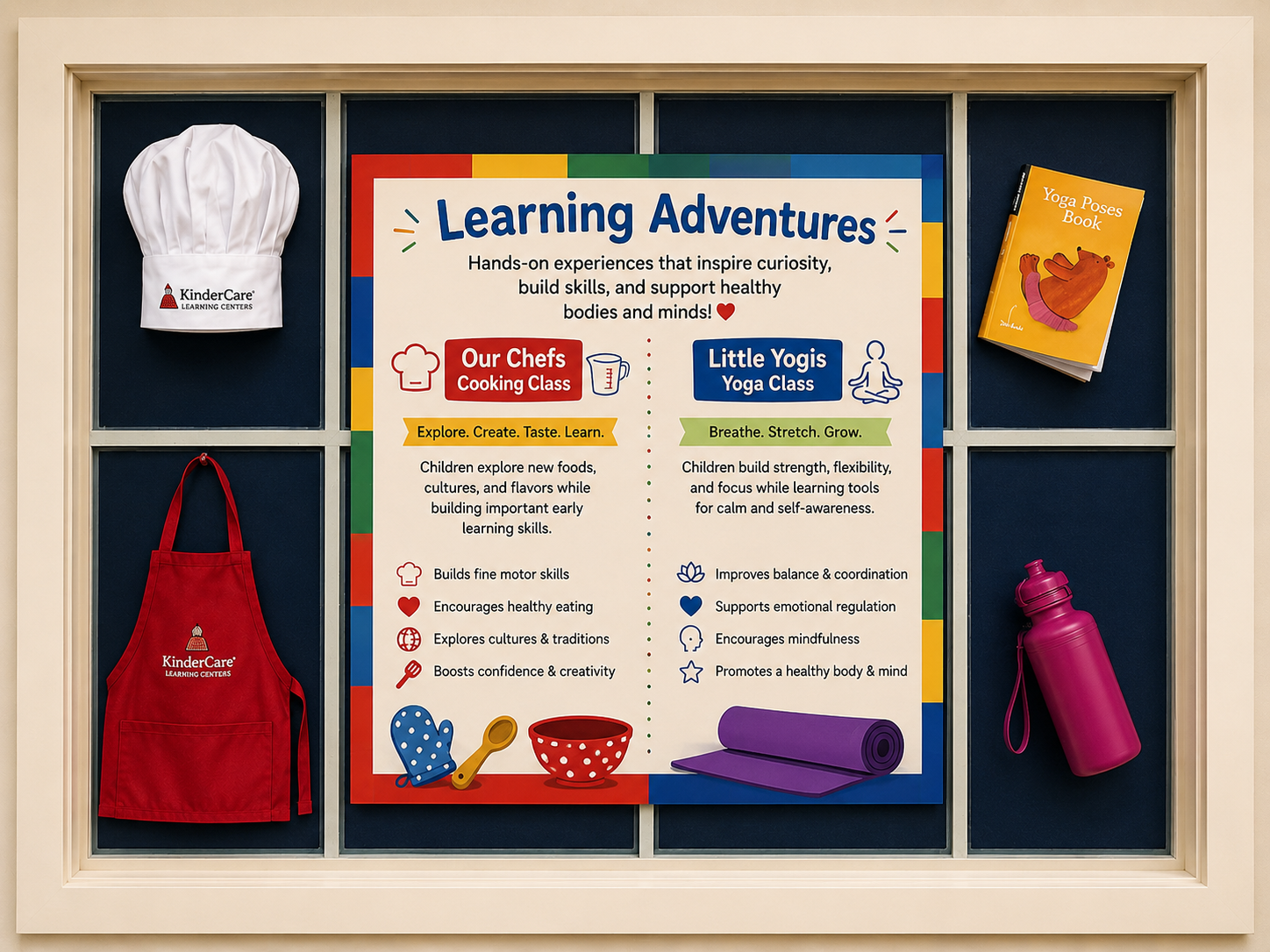
    An enrichment program existed on paper, but nothing at the center made it feel real enough for a family to opt into.

    I gave it an identity, a weekly rhythm, and materials that traveled home — cooking and yoga sessions families could picture their child inside of, and teachers could sustain without extra planning load.

    • Program identity
    • Cooking & yoga enrichment
    • Take-home recipe cards

    A program becomes real when it has a rhythm people can keep — not when it has a document that describes it.

    Selected artifact

    Learning Adventures program board with chef hat, apron, yoga book and water bottle displayed at the center
    Program Board — displayed daily at the center.
  3. 03For teachers and center leadership

    Everyday Operations

    Classroom needs traveled by interruption — a teacher chasing a supply, a director answering the same question twice, a district leader with no view of what a center actually needed.

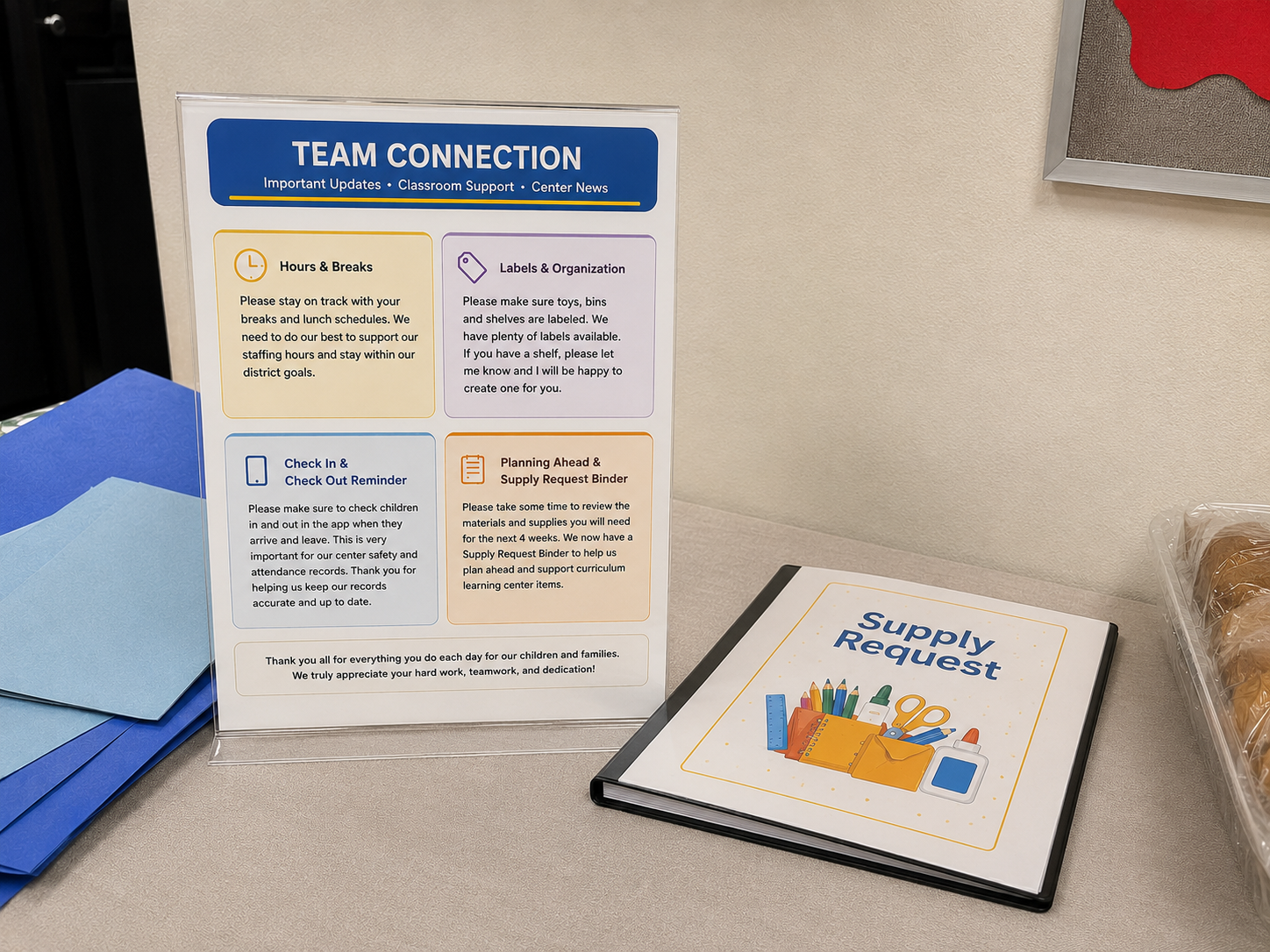
    I designed the operation, not the artifact: recurring decisions moved out of people's heads and into visible, shared systems. The Supply Request Binder gave leadership standing visibility into classroom needs and made ordering predictable instead of reactive. The Team Connection board held teachers and leadership to one version of the day. Classroom labels and routines lowered cognitive load while making expectations consistent from room to room.

    • Supply Request Binder — visibility for leadership
    • Team Connection board — daily alignment
    • Classroom labels & routines — consistency across rooms

    A good system serves two people at once: the person doing the work and the person accountable for it.

    Selected examples

    Team Connection board and the Supply Request binder in place in the center's staff area
    Team Connection Board & Supply Request Binder — operational systems used by teachers and leadership.
  4. 04For teachers, leadership, and families

    Culture & Recognition

    Early childhood work is demanding and modestly paid. Milestones passed quietly, appreciation stayed private, and the pressure of that gap showed up as turnover.

    I treated recognition as a leadership instrument rather than a gesture — celebrations families joined, appreciation teachers could hold onto, and event communication clear enough that nobody arrived unprepared. Visible culture gave leadership something to build engagement, belonging, and retention on.

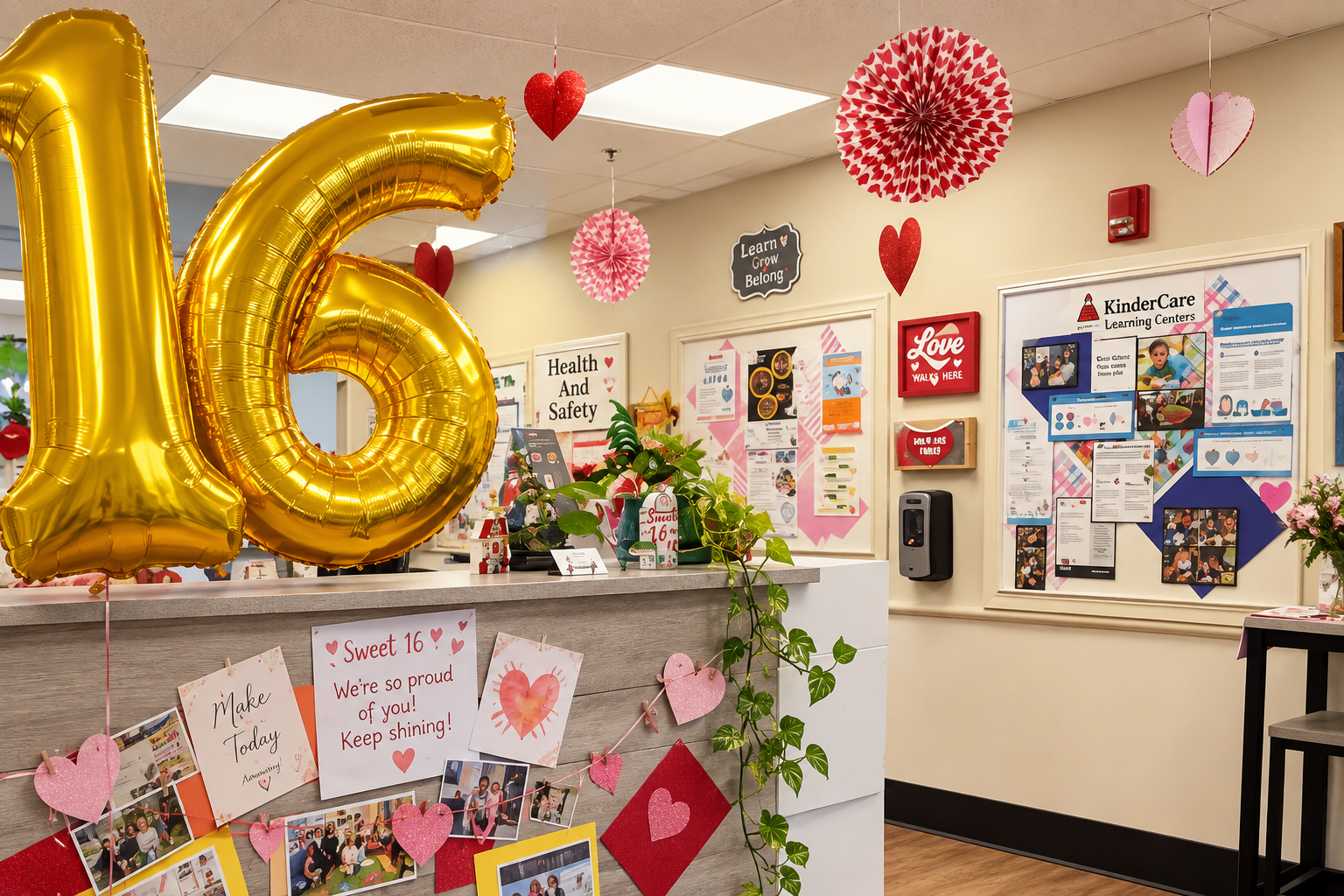
    • Sweet 16 center celebration
    • Staff appreciation
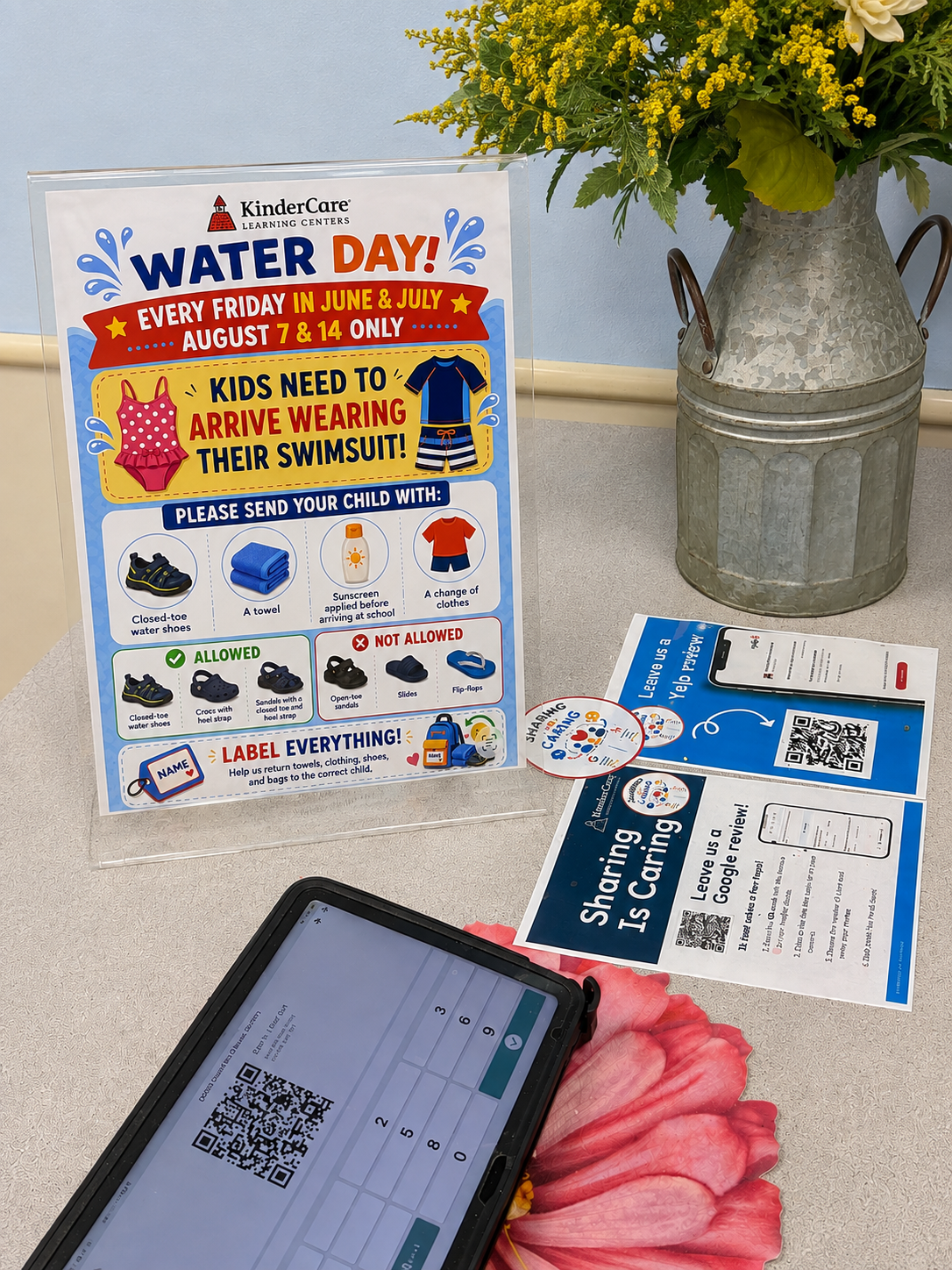
    • Event communication

    Recognition is not decoration. In a demanding environment, it is one of the few levers that keeps good people staying.

    Selected artifacts

    Sweet 16 celebration display in the center lobby with balloons, photographs and handwritten notes
    Sweet 16 Celebration — community recognition inside the center.
    Water Day family information sign displayed at the front desk alongside review cards
    Event Communication — displayed at the front entrance.
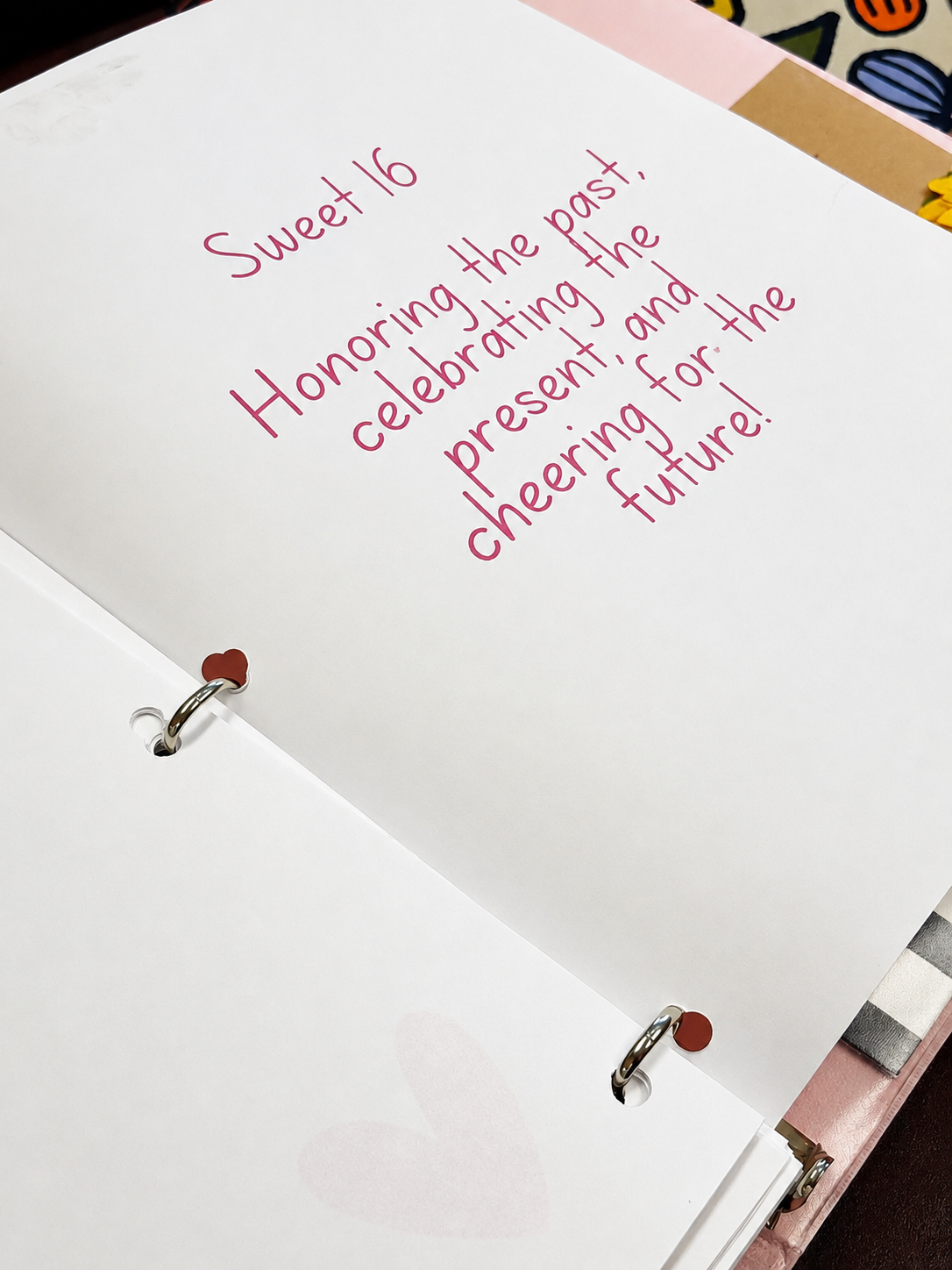
    Handwritten Sweet 16 binder page reading honoring the past, celebrating the present, cheering for the future
    Family Appreciation Book — messages from families that strengthened belonging across the center team.

On using AI

AI drafted. A human decided. Messages still carried the voice, timing, and judgment of someone who knew the families they were written for — which is why engagement moved.

75%

Family engagement with center communication

A note on these images: many original materials included photographs of children, families, or internal center information that cannot be shared publicly. Some visuals here have been thoughtfully recreated with AI while preserving the original communication goals, design decisions, and implementation. The work itself is authentic — initiatives I planned and delivered within KinderCare's visual identity.

My Role in the Work

  • Learning Strategy
  • Instructional Design
  • Content Development
  • Content Architecture
  • Coaching & Teacher Support
  • Family & Community Engagement
  • Continuous Improvement
  • Implementation

At the center, the work spanned program design, teacher coaching, family communication, and the everyday systems that kept all three connected.

Tools & Technologies

  • Canva
  • PowerPoint
  • Word
  • Google Workspace
  • KinderCare app
  • AI-assisted workflows
  • Print production

An ecosystem, not a set of deliverables

Programs, family communication, teacher tools, and everyday rituals were never separate projects. They were one connected system — designed so a center could keep running well after any single piece of it was made.

The room becomes a system. The care has to travel.

Movement II · Systems

Designing Learning Systems

Global Learning Experience · Apple Maps (via Apex Systems and RMSI)

I design learning systems that help global organizations learn consistently, efficiently, and at scale.

When learning has to travel across locales, roles, and time zones, it stops being a course and starts being a system — one where tone, accessibility, and quality are decisions made once and carried everywhere. This movement is about that shift: from designing the artifact to designing the conditions that let thousands of small artifacts stay coherent.

Knowledge in motion

A learning system is what lets knowledge move — from one person, to a team, to a shared way of working, to an organization that sounds like itself in every language it speaks.

01

People

one learner

02

Teams

shared practice

03

Systems

one voice, everywhere

04

Organizations

learning at scale

Every learning system begins with one person trying to understand something new.

Ways of working

How care travels at scale.

01

Design the system, not the course.

A single course is a small answer. A system is how a global organization learns the same thing, in the same voice, across many locales, roles, and time zones — without losing precision. The work becomes instructional design at the scale of an LMS, a documentation set, and a shared design language.

02

Treat accessibility as a baseline.

Accessibility isn't the final polish. It's the shape of the first draft — the heading hierarchy, the reading order, the alt text, the language choices — everything designed to be understood by more people from the start. It's also how learning survives a migration between platforms without losing the people it was built for.

03

Partner with the people who know.

SMEs, engineers, program managers, localization, QA. The role of the learning designer is to translate expertise into experience — and to protect the reviewer's time as carefully as the learner's. Cross-functional collaboration is not a soft skill here; it's the mechanism by which precision travels.

04

Make quality a shared habit.

Quality that only lives at launch is quality that fails at scale. Lightweight review cadences, clear microlearning patterns, and honest QA feedback loops let care survive across contributors, locales, and releases.

05

Improve continuously, quietly.

Small, steady iteration — informed by data, feedback, and the field — is what keeps a global learning system alive after the first release. The wins are rarely visible from the outside. That's usually a sign the system is working.

My Practice

The work is confidential. The practice is not.

What I was responsible for

  • Learning Strategy
  • Scenario Design
  • Interaction Design
  • Accessibility
  • Documentation
  • Quality Assurance
  • Cross-functional Collaboration

Across a global learning system, my responsibility was less about producing one course and more about keeping tone, accessibility, and quality consistent everywhere the learning travelled.

My Influence on the Team

The clearest evidence of the work is how the team worked after it.

My work became a reference.

Colleagues used what I built as the example to design against — a shared point of reference for how our learning should look, read, and behave.

Peer review became regular practice.

The structured peer review I championed was adopted by the team and became part of how projects were reviewed, not an exception.

Documentation and quality got steadier.

Clearer documentation and consistent standards made quality repeatable across authors, projects, and languages.

I built the experience, not only the content.

Learning scenarios, interactions, illustrations, and interactive learning experiences created with Apple's internal authoring tools.

Tools & Technologies

  • Articulate Storyline
  • Articulate Rise
  • Camtasia
  • Keynote
  • Pages
  • Apple internal authoring tools
  • Apple LMS
  • Localization workflows

The work lives inside the product. The way of working travels with me — into every project since, and every project before.

Long before Apple, this same practice was already at work — in classrooms, engineering rooms, and industries that looked nothing alike.

Discretion is part of the craft.

Before Apple, the same practice was already moving — through classrooms, engineering teams, insurance offices, and oil fields. The industries changed. The work never did.

Movement III

III

One Practice. Many Industries.

Different industries. One consistent practice — designing learning ecosystems that help people understand change.

Across engineering, government, insurance, global technology, and education, the work has always been the same underneath: helping people make sense of change, build confidence, grow into leadership, and share what they know with others. Technology carried the learning; culture made it last. Each story is told in full here; the deliverable at the end is simply the work itself.

Featured engagement · 01 · Public Sector

Designing Learning for a Nation

Brazilian Demographic Census · IBGE

Teaching an entire country's field workforce to count itself — accurately, consistently, at scale.

Scope of contribution

  • Nationwide initiative across every Brazilian state
  • One methodology delivered in three formats (in-person, print, low-bandwidth digital)
  • Legally sensitive definitions translated into learner decisions
  • Curriculum architecture for a temporary, distributed field workforce

Overview

A national census is one of the largest coordinated learning efforts a country runs. Hundreds of thousands of temporary workers, spread across every state, need to interpret the same questions the same way — often in places without reliable connectivity.

Challenge

Standardize how a distributed field workforce collects sensitive data across vastly different regions, literacy levels, and technology conditions — without diluting the rigor of the methodology.

Approach

Broke the methodology into short, decision-based learning moments. Designed a modular curriculum that could be delivered in person, on paper, and through low-bandwidth digital formats — while preserving one shared standard of accuracy.

Learning Strategy

One methodology, three delivery formats, and one shared vocabulary — so a field worker's answer in a remote municipality would mean the same thing as an answer in the capital.

Process

Partnered with methodologists and regional coordinators to translate legal definitions into learner-facing decisions. Prototyped, tested with field teams, revised, and only then scaled.

Outcomes

A field workforce prepared to collect consistent, defensible national data. Learning that traveled from the capital to the smallest municipality without losing meaning.

My Role in the Work

  • Learning Strategy
  • Instructional Design
  • Curriculum Architecture
  • Content Development
  • Stakeholder Collaboration
  • Quality Assurance

Learning strategy, instructional design, and curriculum architecture across formats.

Tools & Technologies

  • Articulate Storyline
  • PowerPoint
  • Word
  • InDesign
  • Camtasia
  • LMS

Integrated Training Toolkit

Featured Artifact — Field Training Manual

The Field Training Manual was one component of a complete learning solution built to prepare census workers before and during instructor-led training — print, practice, classroom, and scenario-based video designed as a single experience.

Printed manual · part of an integrated toolkit · Brazilian Demographic Census · IBGE · Silent motion presentation · 33 seconds

The Learning Ecosystem

  • Field Training Manual

    The reference text: methodology translated into decisions a worker could make on their own.

  • Companion Workbook

    Practical exercises studied independently, then reviewed together in the classroom.

  • Instructor-Led Training

    Classroom sessions freed from lecture, spent on discussion and application instead.

  • Scenario-Based Videos

    Realistic census situations, performed by actors, showing judgment rather than describing it.

  • One Visual Language

    Illustrated characters drawn from the video actors, so print and screen felt like one course.

Learning Strategy

  • Manual and workbook were distributed ahead of the classroom, so learning began before day one.
  • Participants studied and practiced independently; facilitators then reviewed the workbook activities together.
  • Classroom time shifted from lecture to application — discussion, judgment calls, and difficult cases.
  • Videos anchored the methodology in authentic field situations rather than abstract rules.

My Contribution

  • Learning strategy and curriculum architecture across every format.
  • Instructional design of the manual and the companion workbook.
  • Scenario writing and content direction for the training videos.
  • A shared visual and editorial language holding the toolkit together.

Why This Artifact

One object holds the whole practice: rigor preserved, complexity reduced, and a learner supported at the moment the decision has to be made.
Featured engagement · 02 · Energy

Leading Change Across 110,000 Employees

Petrobras · Multi-year engagement

A long professional engagement — many initiatives, one practice — helping a global energy company learn its way through transformation.

Initiatives within this engagement

  • Change management for enterprise system rollouts
  • Learning strategy across business units
  • Self-Booking travel adoption program
  • Organizational transformation communications

Scope of contribution

  • Multi-year engagement
  • 110,000+ employees reached
  • Enterprise systems, policy, and cultural rollouts
  • Executive-facing narrative and change strategy

Overview

Petrobras was not a single project. Across several years I contributed to a portfolio of change and enterprise learning initiatives supporting a workforce of more than 100,000 people through systems, policy, and organizational transformation.

Challenge

Translate technical, top-down transformations into learning and change experiences that made sense to engineers on rigs, analysts in offices, and leaders coordinating both — without losing the thread between them.

Approach

Built the change narrative first, learning second. Segmented the workforce by the decisions each group actually had to make, then designed role-specific journeys from 'what is changing' to 'what I do differently on Monday.' The same practice traveled across initiatives.

Learning Strategy

Anchor every rollout in the decision each role has to make differently — then design communications and learning around that decision, not around the system.

Process

Mapped stakeholders and impacts per business unit, drafted the change narrative with sponsors, designed role-based journeys, produced learning and communication assets in parallel, then supported adoption with managers as the front line.

Outcomes

Adoption at scale, with a shared vocabulary across a workforce of more than 100,000. Change communication and learning that reinforced each other rather than competed.

My Role in the Work

  • Change Management
  • Learning Strategy
  • Content Architecture
  • Instructional Design
  • Stakeholder Collaboration
  • Implementation

Change strategy, learning architecture, and executive-facing narrative design across a portfolio of initiatives. My résumé carries the fuller breadth of this work.

Tools & Technologies

  • Articulate Storyline
  • Articulate Rise
  • PowerPoint
  • Camtasia
  • Vyond
  • InDesign
  • Enterprise LMS

Performance Support Toolkit

Featured Artifact — Self Booking Reference Guide

Following the implementation of Petrobras' new Self Booking system, employees kept asking the same operational questions after completing training. Rather than relying on Change Agents and the Help Desk alone, we built a concise performance support toolkit employees could consult while doing the real task — learning that continues after the classroom closes.

Reference guide · part of a performance support toolkit · Petrobras · Multi-year engagement · Silent motion presentation · 20 seconds

The Learning Ecosystem

  • Self Booking Reference Guide

    The representative artifact: the most common procedures, written to be read mid-task.

  • Frequently Asked Questions

    The questions Change Agents and the Help Desk actually received, answered in place.

  • Step-by-Step Procedures

    The daily operations, reduced to the fewest decisions a traveler has to make.

  • Decision Support

    Guidance for the edge cases where employees hesitated — policy made practical.

  • Pointers to Further Learning

    A closing invitation back to the formal training and support channels already in place.

Learning Strategy

  • The toolkit complemented the formal training — it never replaced it.
  • Content was selected from real support demand, not from the system's feature list.
  • Procedures and frequent questions were consolidated into one short, scannable reference.
  • Just-in-time by design: findable in seconds, while the work is happening.

My Contribution

  • Instructional design and performance support design.
  • Content strategy drawn from Change Agent and Help Desk demand.
  • Visual communication and editorial structure of the guide.
  • Knowledge reinforcement after the formal training ended.

Why This Artifact

Rather than demonstrating course development, this artifact shows how learning continues after training — reducing cognitive load, reinforcing key procedures, and giving employees practical guidance exactly when they need it.

Featured engagement · 03 · Engineering

Helping Engineers Learn by Building

CBCA · Steel Construction

A learning experience shaped like the work itself — a studio, not a classroom.

Engineers don't trust learning that looks nothing like their work. So the learning had to look like the work.

Overview

Engineers don't learn technical practice by watching slides. They learn by making decisions, seeing consequences, and iterating with peers. The task was to design an experience that respected how engineers actually build expertise.

Challenge

Move technical practitioners past passive content into a learning experience that mirrored real engineering judgment.

Approach

Designed a project-based curriculum where each module ended in a produced artifact — a drawing, a calculation, a reviewed decision. Peer critique and expert review replaced the traditional 'course completion' moment.

Learning Strategy

Treat the deliverable as the assessment. If an engineer can produce and defend the artifact, the learning is real.

Process

Worked with technical experts to identify the judgments that separate a competent engineer from a novice, structured the curriculum around producing those judgments, then built the critique and review rhythm that held it together.

Outcomes

A learning experience engineers took seriously because it looked like the work they respected. Knowledge that transferred into practice, not just onto a certificate.

My Role in the Work

  • Learning Strategy
  • Program Design
  • Instructional Design
  • Content Development
  • Stakeholder Collaboration

Program design, instructional strategy, and facilitation model.

Tools & Technologies

  • Articulate Storyline
  • PowerPoint
  • Camtasia
  • Canva
  • LMS

Online Learning Experience

Featured Artifact — Light Steel Framing

An online course on Light Steel Framing for engineers and construction professionals. Here the interaction itself is the artifact: rather than describing the experience, the presentation lets the original recording speak — the same course, explored at a learner's pace.

Interactive online course · screen recording · CBCA · Steel Construction · Silent motion presentation · 39 seconds

The Learning Ecosystem

  • Structured Learning Units

    Four units that build from steel and profiles toward whole-structure decisions.

  • Technical Illustration

    Drawings that carry the explanation, so the text can stay short.

  • Guided Detail Comparison

    Side-by-side connection details (A and B) learners step through themselves.

  • Field Photography

    Real construction imagery anchoring each concept in built work.

  • Self-Paced Navigation

    Progress kept visible, so an engineer can leave and return without losing the thread.

Learning Strategy

  • Lead with the drawing; use text only where the drawing cannot speak.
  • Ask learners to compare details rather than memorize definitions.
  • Keep each screen to a single technical decision.
  • Let the pace belong to the learner — nothing advances on its own.

My Contribution

  • Learning experience and interaction design.
  • Instructional structure across the four units.
  • Editorial treatment of dense technical content.
  • Visual language shared with the technical illustrations.

Why This Artifact

Unlike the printed artifacts in this collection, this piece can only be understood by being used. It shows how the same practice adapts when the medium becomes interactive — the technical rigor unchanged, the rhythm handed to the learner.

Also in the exhibition

Complexity of a different shape — the same practice at work.

Engagement · Financial Services

Helping Learning Become a Competitive Advantage

Insurance Market

When the product is trust, the differentiator is how well your people can explain it.

Guiding principles

  • Practice the moments that matter
  • Managers coach — learning doesn't stop at the module
  • Compliance becomes craft when the scenario is real

Overview

Within the insurance industry I designed learning solutions for two different organizational challenges. Together they show learning strategy supporting distinct stages of growth — enabling the partners already selling, and preparing the professionals not yet hired.

Challenge

Turn a sales and service workforce into a strategic asset by making learning feel less like compliance and more like craft.

Approach

Rebuilt the learning offer around real customer conversations. Replaced generic modules with scenario-based practice tied to the moments that mattered most.

Learning Strategy

Practice the conversation, not the policy. Every scenario came from a moment the team actually faced with a customer.

Process

Interviewed top performers, harvested the real conversations, rebuilt the curriculum around them, and equipped managers to coach after the module ended.

Outcomes

Learning positioned as a business lever rather than a cost line — and adopted willingly by the people who used it.

My Role in the Work

  • Learning Strategy
  • Curriculum Redesign
  • Instructional Design
  • Content Development
  • Stakeholder Collaboration

Strategy, curriculum redesign, and manager coaching model.

Tools & Technologies

  • Microsoft Word
  • Microsoft PowerPoint
  • Microsoft Excel
  • Camtasia
  • Adobe Photoshop
  • Articulate Rise

Learning Solution 01

Partner Enablement

A learning solution built for insurance brokers already in the field. Digital learning experiences and educational resources gave partners the product knowledge, sales readiness, and confident language they needed in front of a customer — turning preparation into business performance.

Partner Enablement Through Digital Learning

Featured Artifact — Insurance Products

An interactive learning experience built so partners could explain insurance products with confidence. As with the course for engineers, the interaction itself is the artifact: rather than describing the experience, the presentation lets the original recording speak — the same module, explored at a learner's pace.

Interactive eLearning experience · screen recording · Insurance Market · Silent motion presentation · 53 seconds

The Learning Ecosystem

  • Product Foundations

    Each product introduced through what it protects, before what it contains.

  • Customer-Facing Language

    Terminology translated into the words a partner can actually use in conversation.

  • Interactive Exploration

    Coverage, conditions and exclusions revealed by the learner rather than listed.

  • Knowledge Checks

    Short checkpoints that rehearse the decision, not the definition.

  • Self-Paced Navigation

    Progress kept visible, so a partner can return between customer appointments.

Learning Strategy

  • Start from the customer's question, not the product structure.
  • Let learners uncover detail instead of reading it in one block.
  • Keep each screen to a single thing a partner must be able to explain.
  • Confidence is the outcome — completion is only the record of it.

My Contribution

  • Learning experience and interaction design.
  • Instructional structure across the product modules.
  • Editorial treatment of dense policy content.
  • Visual language consistent with the brand and the sales conversation.

Why This Artifact

This artifact shows the practice applied to enablement: partners who sell what they understand. The medium is digital and self-paced, but the intent is unchanged — give people the clarity they need at the moment they have to speak.

Learning Solution 02

Talent Acquisition & Onboarding

A learning solution for the people who had not yet arrived. Recruitment, evaluation, and early development were designed as one integrated learning ecosystem — attracting, preparing, and retaining high-performing brokers, and supporting long-term business success.

  • Recruitment portal
  • Educational infographics
  • Instructional videos
  • Quizzes
  • Candidate evaluation journey
  • Cross-functional collaboration to improve the recruitment funnel
  • Onboarding learning experiences
  • Instructor-led training materials

Talent Acquisition & Onboarding Ecosystem

Featured Artifact — Recruitment Portal

A second experience within the same industry, designed for a different audience. Rather than treating recruitment and onboarding as separate initiatives, we designed one connected journey that carried a candidate from first interaction through their earliest development inside the company. The portal is the artifact because it is where that journey began — and where learning already started.

Recruitment website · screen recording · Insurance Market · Silent motion presentation · 41 seconds

The Learning Ecosystem

  • Recruitment Website

    The first encounter: what the profession is, what it asks, and what it can become.

  • Educational Infographics

    The market and the career explained visually, before any formal training existed.

  • Instructional Videos

    Short pieces that let a candidate understand the work by seeing it.

  • Quizzes & Candidate Evaluation

    Structured checkpoints that helped candidates and the company assess fit honestly.

  • Onboarding Experiences

    Learning that continued the moment a candidate became a broker.

  • Instructor-Led Materials

    Facilitation guides and classroom pieces so the journey stayed consistent as it scaled.

Learning Strategy

  • Begin teaching before the hire — candidates should learn what the work really is.
  • Let self-selection happen early, through understanding rather than screening alone.
  • Carry one continuous journey across recruitment, evaluation and onboarding.
  • Design with the business areas that own the funnel, not beside them.

My Contribution

  • Learning ecosystem design across recruitment and onboarding.
  • Instructional design for the portal, infographics, videos and quizzes.
  • Candidate evaluation structure and onboarding curriculum.
  • Collaboration with multiple business areas to improve the recruitment funnel.

Why This Artifact

Where the first artifact in this engagement served partners already in the field, this one serves people who had not yet arrived. Together they show learning supporting the whole talent journey — attracting the right professionals, preparing them properly, and contributing to stronger retention, sales performance, and client satisfaction.

Engagement · Construction · Field Operations

Making Complex Procedures Understandable

Concremat

Turning dense procedural knowledge into something a person on site could actually use.

What shipped

  • Procedures rebuilt around the moment of use
  • Decision-first structure, paragraph-second
  • Validated on site before rollout

Overview

Field workers often have to follow procedures written for auditors, not for them. The gap between what is documented and what is doable becomes a safety and quality problem.

Challenge

Redesign procedural knowledge so field teams could act on it under real conditions, without losing regulatory precision.

Approach

Rewrote and re-illustrated procedures around the moment of use. Structured them so the first thing a worker saw was the decision, not the paragraph.

Learning Strategy

Decision first, explanation second. A procedure should answer 'what do I do now?' before it justifies itself.

Process

Shadowed the work, rewrote with subject experts, illustrated the critical steps, validated on site, then handed over a template the organization could maintain.

Outcomes

Procedures people actually read, and follow — and a documentation system the organization could keep current.

My Role in the Work

  • Content Architecture
  • Instructional Design
  • Content Development
  • Quality Assurance
  • Implementation

Content architecture, visual design of procedures, and field validation.

Tools & Technologies

  • InDesign
  • Word
  • PowerPoint
  • Canva

Procedural Learning at the Moment of Use

Featured Artifact — Making Complex Procedures Understandable

Procedural knowledge rebuilt so a person on site could act on it under real conditions. As with the other recordings in this exhibition, the interaction itself is the artifact: rather than describing the experience, the presentation lets the original recording speak.

Interactive procedural learning · screen recording · Concremat · Silent motion presentation · 35 seconds

The Learning Ecosystem

  • Decision-First Structure

    Each procedure opens with what to do now, before why it exists.

  • Illustrated Critical Steps

    The steps where mistakes are costly are shown, not only written.

  • Plain Operational Language

    Regulatory precision kept, auditor phrasing removed.

  • Checkpoints in Context

    Understanding tested against the situation, not the definition.

  • Maintainable Template

    A structure the organization could keep current without redesign.

Learning Strategy

  • Write for the moment of use, not the moment of audit.
  • Show the step where getting it wrong costs the most.
  • Keep one decision per screen.
  • Compliance holds only when the procedure is genuinely followable.

My Contribution

  • Content architecture across the procedural set.
  • Instructional structure and interaction design.
  • Editorial rewriting of dense regulatory content.
  • Visual treatment of the critical steps.

Why This Artifact

This artifact shows the practice at its most operational: complexity is not simplified away, it is reorganized around the person who has to act. Clarity here is a safety and quality outcome, not a stylistic one.

Engagement · Manufacturing · Retail Network

Precision Learning for a Precision Brand

Michelin

Product knowledge a retail team could hold in mind while a customer waits.

What shipped

  • Technical specification made sayable at the counter
  • Product shown first, specification named second
  • Brand standard of craft held across every screen

Overview

Retail teams are asked to explain a highly engineered product in plain language, at the counter, in the time a customer gives them. The knowledge exists — the difficulty is making it usable in that moment.

Challenge

Turn dense technical product specification into product knowledge a salesperson could recall, trust, and say out loud.

Approach

Built a digital learning experience around the product itself — the tyre examined up close, its markings decoded interactively, each concept resolved before the next one arrives.

Learning Strategy

Show the product, then name what is being seen. Understanding a specification is easier when it is attached to something visible.

Process

Worked from the technical documentation and the brand's own visual standard, structured the concepts in sequence, then designed interactions that let a learner uncover meaning rather than read it.

Outcomes

Retail teams able to explain the product with confidence — and a learning standard that matched the care of the brand itself.

My Role in the Work

  • Program Design
  • Instructional Design
  • Content Development
  • Quality Assurance

Instructional design, content structure, interaction design, and visual standard.

Tools & Technologies

  • Articulate Storyline
  • PowerPoint
  • InDesign
  • Camtasia
  • LMS

Retail Learning & Product Knowledge Enablement

Featured Artifact — Precision Learning for a Precision Brand

Product knowledge rebuilt so a retail team could use it in front of a customer. As with the other recordings in this exhibition, the interaction itself is the artifact: rather than describing the experience, the presentation lets the original recording speak.

Interactive digital learning · screen recording · Michelin · Silent motion presentation · 41 seconds

The Learning Ecosystem

  • Product-Led Sequence

    The product is shown first; the specification is named second.

  • Interactive Decoding

    Markings and indices revealed on the product, not listed beside it.

  • One Concept per Screen

    Each idea resolved before the next one is introduced.

  • Sales-Floor Language

    Technical precision kept, engineering phrasing translated.

  • Brand Visual Standard

    Every screen held to the same standard of care as the product.

Learning Strategy

  • Anchor every specification to something the learner can see.
  • Let the learner uncover meaning rather than read it.
  • Teach the sentence a salesperson will actually say.
  • Consistency of craft is itself part of the message.

My Contribution

  • Instructional structure across the product knowledge sequence.
  • Interaction design for the decoding moments.
  • Editorial translation of technical specification.
  • Visual standard and quality assurance across the experience.

Why This Artifact

This artifact shows the practice in a commercial setting: knowledge is not simplified, it is made sayable. Confidence at the counter is the learning outcome.

Additional engagements

Different industries. The same practice.

Engagement · Education

Where Students Became Creators

Public School · Student-Led Learning Community

A school that learned to teach itself — and kept doing it after I left.

Initiatives within this engagement

  • Student leadership and peer mentoring program
  • Collaborative educational media production
  • Educational video creation with teachers and students
  • Digital communication channels for the school community
  • Knowledge sharing across students, teachers, and leadership

Guiding principles

  • Students as creators, not participants
  • Design the practice, not only the program
  • Sustainability is measured after you leave

Overview

The work began as an educational program and became something larger: a learning community. Students were given ownership of how knowledge was made and shared, teachers gained support with digital tools, and families found a way to stay close to the life of the school.

Challenge

Not to deliver a program, but to build practices the school could keep growing without me.

Approach

Students took the center of the process. Working in teams, they planned content, wrote storyboards, recorded and edited video, organized production, and supported teachers with digital tools — each contributing through a role, each learning from the others. My part was to design the ecosystem, coordinate it, and step back as their autonomy grew.

Learning Strategy

Make learners the multipliers. When students teach the school, the knowledge stays in the school.

Process

Alongside the production program, the school's dormant Facebook page was redesigned from a notice board into an active channel connecting families, students, teachers, and leadership; the YouTube channel became the home for the videos the students made. Together they formed one connected communication ecosystem.

Outcomes

The practices outlasted the project. The channels, the collaborative habits, and the student leadership culture remained part of the school — and years later, when schools had to move online, those foundations were already in place and still serving the community. Evidence that the system, not the person, was the design.

My Role in the Work

  • Learning Ecosystem Design
  • Student Leadership Facilitation
  • Media Production Coordination
  • Digital Communication Strategy
  • Teacher Enablement

Ecosystem design, program coordination, student facilitation, and digital communication strategy.

Tools & Technologies

  • Video production
  • Editing software
  • YouTube
  • Facebook
  • Canva
  • PowerPoint

A Living Learning Ecosystem

Featured Artifact — A community that kept producing

No single artifact represents this work. What follows is a curated collection — the student-made identity, the school's communication page, the video channel, and the collaborative production model that connected them. Together they show a learning community, not a set of deliverables.

Community Story · Curated collection · Public School · Student-Led Learning Community · Silent · 55 seconds

The Learning Ecosystem

  • Monitores em Ação — student identity

    Name, logo and visual language designed by the students themselves, after exploring several concepts together.

  • Facebook — the school's communication platform

    A dormant page redesigned into the channel connecting families, teachers, students, events and the leadership program.

  • YouTube — where student knowledge lived

    A home for the educational videos students planned, recorded and edited for the wider school community.

  • Collaborative production model

    Planning, storyboarding, recording, editing and peer teaching — roles students held, and passed on.

  • Engagement materials

    Infographics and communication pieces made by the student team to bring the whole school into the project.

Learning Strategy

  • Give learners ownership of the identity before asking for the work.
  • Make communication part of the learning strategy, not an announcement channel.
  • Let students teach: knowledge produced in the school stays in the school.
  • Design practices the community can keep running without the designer.

My Contribution

  • Ecosystem and program design across channels and production.
  • Facilitation of the student leadership and mentoring practice.
  • Digital communication strategy for families, teachers and students.
  • Teacher enablement, then a deliberate step back as autonomy grew.

Why This Artifact

The communication ecosystem, the mentoring practices and the production model remained active long after the design work ended — and were already in place when the school had to move online years later. The real outcome was not the videos or the posts. It was a learning culture that kept growing.

A closing note

Learning evolves. So do I.

Every organization I have joined brought its own culture, its own technologies, and its own ways of designing learning. The tools below are not a résumé — they are the environments I adapted into. Technology has never been the destination. It has always been the vehicle for helping people understand something new.

  1. Foundations

    Early digital learning

    • Adobe Flash
    • Adobe Captivate
    • Camtasia

    Learning to make dense content watchable — and to design for the constraints of the tool without being defined by them.

  2. Systems era

    Enterprise scale

    • Articulate Storyline
    • Articulate Rise
    • Vyond

    Designing learning that could travel across roles, geographies, and languages inside large organizations.

  3. LMS era

    Ecosystems & platforms

    • SABA
    • Moodle
    • Canvas
    • Absorb
    • Proprietary LMSs

    Working inside each organization's own ecosystem — its governance, its data, its ways of certifying that learning happened.

  4. Apple era

    Inside a product organization

    • Apple internal learning tools
    • Apple LMS

    Learning as a product discipline — shipped with the same craft as the software it lives beside.

  5. Now

    AI-assisted practice

    • AI-assisted workflows
    • Prompted design systems
    • Rapid prototyping

    Using AI to move faster from insight to prototype — while keeping the design decisions squarely human.

Not a jump from one technology to another — a continuous practice of adapting to whatever environment the learning had to live in.

Closing reflection

The industries changed. The learners changed. The technologies evolved, and so did the business challenges.

The practice underneath them never did — designing learning that helps people grow, adapt, and perform with confidence.

Different rooms. Different learners. The same quiet practice — designing so people can grow.